You will receive a confirmation email with your password within the next few minutes.
Please ensure to check your junk mail folder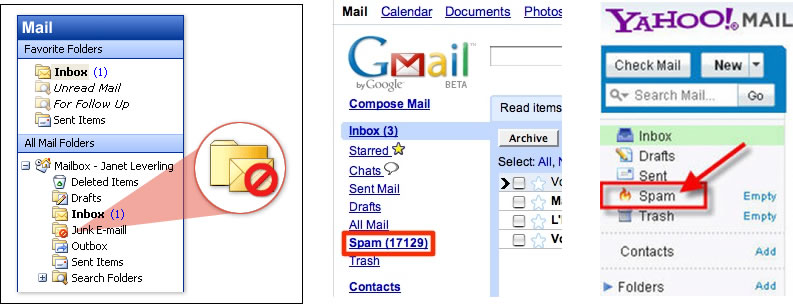
You will see in the menu bar above there is a login, please use this for future login. Enjoy the course !
IMPORTANT…
We want you to have the best experience here at ZOX Pro Training. Please take the steps listed below to properly set up your computer for the best results.
1. Whitelisting
The Internet has become unreliable for email delivery. Your ZOX Pro Account details and part of your training come to you by email. If you do not take this step, we cannot be assured you will receive these important emails. It is the first and MOST IMPORTANT step.
*@zoxpro.com
*@zoxpro.info
*@zoxpro.org
*@zoxprotraining.com
*@ebrain.com.au
(Clickbank Confirmation Notice: Please check you various folders, including Junk and Spam, if your Confirmation Notice did not make it into your “IN BOX”.)
1b. Alternative email Service
If you continue to have problems communicating through email with us, we have found the Gmail seems to be the easiest for us to communicate with. You can get a free gmail.com address by going to this link:
https://www.google.com/gmail/2. Browser Selection
Browser ability counts for the best viewing and experience here.
Google Chrome – First Preference – please download a free copy if you do not have it. You can download it here: https://www.google.com/chrome/browser/features.html
Firefox – Second Preference
Most other browsers, like Internet Explorer, need additional programs to be loaded in order for the training area to respond correctly.
Safari – Don’t bother.
Mobile phones, notepads, etc. – Most work well when you download Chrome from your App Store. To print out .pdf files, you should be able to interface with a printer.
3. Helpdesk
The Helpdesk is your hub for solving issues with ZOX Pro Training. If you have a question or are having an issue, please ask it here. https://ZOXpro.org/helpdesk
You can also use the Helpdesk for asking about other services, such as seminars and coaching.
(NOTE: Your ZOX Pro Password will not work with the Helpdesk. You would need to set up your own password by selecting “Forgot Password”.)
4. Setting up delivery of Supplemental Training emails.
Please fill in this form and push SUBMIT to be added to the delivery system:
Thank you for taking the time to cover the previous steps. It will make your learning experience much better. We know you will have great results from integrating ZOX Pro Training into your daily life.
Shannon Panzo, PhD
